So, here am i with some more geekish things... not actually geekish for all, especially for them who generally twitter and all those things!!
Most of you would have seen messy urls like the one when you use your orkut account, or facebook, or going so deep in wikipedia, or something sorta... what if you want to share that laaaaaaaaaarge url with your friends, especially what if you wanna write that url into his hand or his register (with his pen... :) anywys, that dosent matters), so here the problem comes, so no need to fear when i'm here !!!, just go to:
http://is.gd or:
http://bit.ly
and in no time, they will shorten your url and give you a shorter version which will, obviously be very easy to write in a register or hand or nywher u like. enjoy!!
but always remember, the urls in there are "CASE SENSITIVE"
bye &
take care
will soon be back with some more tricks!!
Prasannjeet 'geek'
Monday, October 19, 2009
Tuesday, October 06, 2009
The "conio.h" Problems ::
Well, to be frank, i dont have a good internet connection that i can always go to any one of the it discussion forums and clear my programming doubts, instead i am a kind of lazy person, so i always use the 'default' thing, i mean google, and after all, i assume that the problem which i am facing now would have been really faced by someone or the other while he was a newbie in programming. And fortunately, my assumption always goes correct. That's something good.
Anyways, when i switched myself from Boroland C++ to the Dev version, the biggest problem i faced was of the conio.h header file, someone who is just aware of programming will surely know what exactly i am talking about. This header is just a part of the boroland thing and is never a standard one, so if you want to use one, you must either download it or just use its replacements:
for
Anyways, when i switched myself from Boroland C++ to the Dev version, the biggest problem i faced was of the conio.h header file, someone who is just aware of programming will surely know what exactly i am talking about. This header is just a part of the boroland thing and is never a standard one, so if you want to use one, you must either download it or just use its replacements:
for
clrscr();
you can use
system("cls");and for
getch();
you can use
std::cin.get();although you may not feel much comfortable with the getch replacement, clrscr replacement will help you in the same way as did the original command.
enjoy..
For more information regarding this thing, this is the place:
http://www.bloodshed.net/dev/faq.html
http://forums.devshed.com/c-programming-42/lib-conio-o-missing-dev-c-4-9-9-0t-184436.html
http://www.daniweb.com/forums/thread11811.html#
THE GOTO COMMAND GUIDE::
int main()
{
char choice;
top: // goto label
cout << "Hello World!" <<>
cout << "Do again? (y/n)" <<>> choice;
cout <<>
if (choice == 'y')
goto top; // goto statement
return 0;
}
There's a religious battle amongst computer scientists regarding the use of the goto statement. Some say yes, some say no -- it is possible that the use of gotos can make code unbelievably difficult to read. The term spaghetti junction is used to describe confusing code that is written with goto statements. I won't say that I'm for or against it. I use it sparingly and I use it when I see that it is fit to do so.
Well the decision is urs, but this is it...
Monday, September 28, 2009
Still Thinking Virus Is Present ??
You’ve received a file from a friend but you’re unsure if the file is safe to open or not. You launch your AntiVirus program to scan and found no problem with it. You’re still scared because that friend of yours is very untrustworthy and you know that you can’t 100% trust antivirus programs as they rely on definitions to detect known viruses. New viruses are growing exponentially every year and it is possible to not have a definition in time to properly diagnose a dangerous line of code. You thought of maybe installing 2 or more antivirus on your computer might give you better protection. You’re WRONG! It is advisable to ONLY install ONE antivirus program on a computer because more than that can cause conflicts.
So you can’t install more than 1 antivirus program and you can’t 100% trust your antivirus. Here’s the solution.
What if you can scan the file that your friend sent you using 30 different types of anti-virus, anti-spyware, anti-malware and anti-hacker engines listed below? Now you can with VirusTotal! Thanks to Hispasec Sistemas, Virustotal offers a free service for scanning suspicious files using several antivirus engines. No download, license or installation needed. Simply upload the file or files that you want to scan and you’ll be in queue for a while depending on the VirusTotal server load to start scanning and display the result.

â—� Aladdin (eSafe)
â—� ALWIL (Avast! Antivirus)
â—� Authentium (Command Antivirus)
â—� Avira (AntiVir)
â—� Bit9 (FileAdvisor)
â—� Cat Computer Services (Quick Heal)
â—� ClamAV (ClamAV)
â—� CA Inc. (Vet)
â—� Doctor Web, Ltd. (DrWeb)
â—� Eset Software (NOD32)
â—� ewido networks (ewido anti-malware)
â—� Fortinet (Fortinet)
â—� FRISK Software (F-Prot)
â—� F-Secure (F-Secure)
â—� Grisoft (AVG)
â—� Hacksoft (The Hacker)
â—� Ikarus Software (Ikarus)
â—� Kaspersky Lab (AVP)
â—� McAfee (VirusScan)
â—� Microsoft (Malware Protection)
â—� Norman (Norman Antivirus)
â—� Panda Software (Panda Platinum)
â—� Prevx (Prevx1)
â—� Softwin (BitDefender)
â—� Sophos (SAV)
â—� Sunbelt Software (Antivirus)
â—� Symantec (Norton Antivirus)
â—� UNA Corp (UNA)
â—� VirusBlokAda (VBA32)
â—� VirusBuster (VirusBuster)
You’d feel safe after scanning with all these 30 types of antivirus engines isn’t it? If one can’t do it, definitely 30 of them can! However, Virustotal does not substitute any antivirus software installed in a PC, as it only scans individual files on demand. It does not offer permanent protection for the user’s system either. Although the detection rate afforded by the use of multiple antivirus engines is far superior to that offered by just one product, these results DO NOT guarantee the harmlessness of a file. Currently, there is not any solution that offers a 100% effectiveness rate for detecting viruses and malware.
Other than uploading through VirusTotal website, you can also scan file by using email.
1. Create a new message with scan@virustotal.com as destination address of your email.
2. Write SCAN in the Subject field (write SCAN- if you do not want to distribute your sample to any AV company).
3. Attach the file to be scanned. Such file must not exceed 10 MB in size. If the attached file is larger, the system will reject it automatically.
4. You will receive an email with a report of the file analysis. Response time will vary depending on the load of the system at the time of placing your request.
I did a test by placing 3 viruses into a ZIP file and upload to VirusTotal for scanning. FileAdvisor wasn’t able to scan compressed file because it reports “no virus found“. As for the rest, it only reports 1 virus and not 3.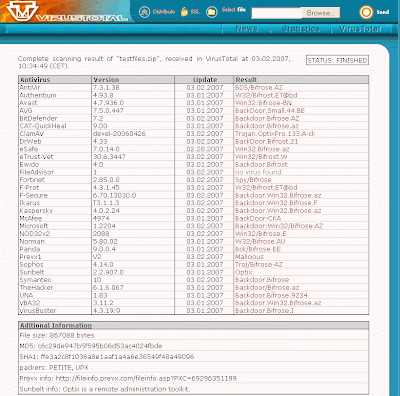
[Scan Ur File With Virus Total]

[Scan Ur File With Virus Total]
Monday, September 21, 2009
MIT blocks MIT
Wow, our college has a really good blocker...
i am able to access blogger, but not manipal.edu, awesome!!
here's the image >>

i am able to access blogger, but not manipal.edu, awesome!!
here's the image >>

Tuesday, September 01, 2009
The College
Manipal Institute Of Technology or MIT as it is called by students here. This is actually my college, now since i am in this college, i am bound not to speak anything bad for it, and anyways, i wont even speak, because on the wthole, i'll say that the college is good (well, everyone regrets they weren't in IITs) so, writing things like this college is the best, or like we have loosed nothing but IITs have loosed something by rejecting us is nothing less than a joke!! (you will find KIIT students repeating this slogans) but yeah, at-least some of us has the potential to compete with those guys (or even gals!!). And the ragging thing, sometimes i think there suspension of seniors as a step against ragging was something very fake, because as the senior's classes started, there was a notice in fine white photo paper hung in our notice board saying 16 students (mostly guys) are suspended from the institute, and what, as a punishment, they were debarred from the campus placements (well, is there any??) i dont think such a punishment is required at all. All the juniors at this time were seen like joyful, without thinking the literal meaning of the sentence. They will NOT get any job after they go out of the college, as graduates, and that to just because they slapped two or three first years!! Awesome, thats fantastic. There are many things in this college which really must be eradicated, but the system behaves as they never even saw that!! And doing something for a small deed was unexpected. But, still i'll surely say MY COLLEGE IS THE BEST ONE voooho!!!
Monday, March 02, 2009
SR Sir, The Ultimate Teacher
Well, to start, i must say that when we compare anything, we do compare it with any absolute thing, which does not change with time, and it applies everywhere! Similarly, one of those absolute thing is SR sir, who dosent change with time, and will never ever change in future too!!
He is the one who has got passion, he teaches as if someone prays to god or kind of!
I mean there is something he is got which lacks everywhere, and probably we cant find any teacher like him outside the country too!!
I would like to show you one of his videos which i am sure you will love! Listen his comments after his song!!
I would like to show you one of his videos which i am sure you will love! Listen his comments after his song!!
Thursday, January 15, 2009
Useful information for my friends....
If you are ever forced by a thief or someone to take money out of an ATM machine, enter your pin number reversed.So if your number is 1254 mark 4521.The ATM machine will give you your money, but will automatically recognize this as a plea for help and will alert the police unknown to the thief.This option is in all ATM machines, but not many people know this.Please pass this information on to others. No harm in keeping this inmind!!
Regards,
Prasannjeet Singh
Regards,
Prasannjeet Singh
Subscribe to:
Posts (Atom)